Week 5: Melee Weapon Mechanics & Status Effect Implementation

Introduction

This week, I expanded the combat system by implementing melee weapon mechanics and status effects based on design specifications. The work included:

  • Debuff systems (poison, bleed, hemorrhage)
  • Weapon-specific mechanics (blocking, AoE stun, damage scaling)
  • Synergy with player expertise (a stat from the XP system)

Collaborating with designers, I ensured these systems align with the game’s strategic combat vision while preparing for future stat integration.

Part 1: Status Effect System

Poison Debuff

  • Mechanic: Stacks increase damage taken, scaled by player expertise
  • Damage calculated as:
    (int)(poisonCount + (poisonCount * (0.2f + (playerExpertise / 100))))

Bleed & Hemorrhage

  • Bleed: 10 stacks trigger Hemorrhage, increasing all incoming damage
  • Network Sync: Uses [Networked] timers and counters
Above is the core implementation of the Dot effect system:

Part 2: Weapon-Specific Mechanics

1. One-Handed Sword (Blocking)

  • Mechanic: Right-click triggers damage reduction
Above is the core implementation of the Blocking system:

2. Mace (AoE Stun)

  • Tradeoff: 15% less damage for AoE stun
Above is the core implementation of the Mace Weapon:

Two-Handed Sword (Expertise Scaling)

  • Mechanic: Damage increases + damage reduction based on expertise

Collaborative Challenges

  1. Design Coordination
    • Adapted placeholder values from word docs into testable formulas
    • Created debug UI to visualize status stacks (Imgur screenshot below)
  2. Network Optimization
    • Reduced RPC calls by using [Networked] properties for timers
    • Resolved de-sync in hemorrhage duration with TickTimer
  3. Art Pipeline
    • Structured code to accept animation events (e.g., OnSwingComplete())
    • Documented transform requirements for weapon prefabs

Reflection

Successes

  • Flexible debuff system supports easy addition of new effects
  • Expertise integration creates meaningful progression
  • Network-friendly architecture maintains performance

Areas for Improvement

  • Current stun effect lacks visual feedback
  • Hemorrhage scaling formula needs playtesting
  • Blocking mechanic doesn’t yet consume stamina

Next Steps

  1. Visual/Audio Feedback
    • Add particle effects for poison/bleed (collaborate with VFX team)
    • Implement blocking sound
  2. Stat Integration
    • Connect expertise to XP system’s level-up menu
    • Balance formulas using designer-provided curves

References

Week 5: Boss Design, Range-Based Projectiles, and Production Challenges

Introduction

Three weeks have passed since my last update due to a combination of a holiday, full-time work, and delays in receiving collaborated models from the design team. Despite these challenges, I focused on two major technical tasks: implementing a multi-phase boss system and refactoring projectile logic to use range instead of lifetime.

Production Notes

  • Next Steps: The balancing documents will be integrated in the following week as the designers finalize their assets.
  • Collaboration Delays: The design team was unable to provide finalized models, offering only placeholder assets and balancing documents. This slowed visual progress but allowed me to focus on core gameplay programming.

Boss System Implementation

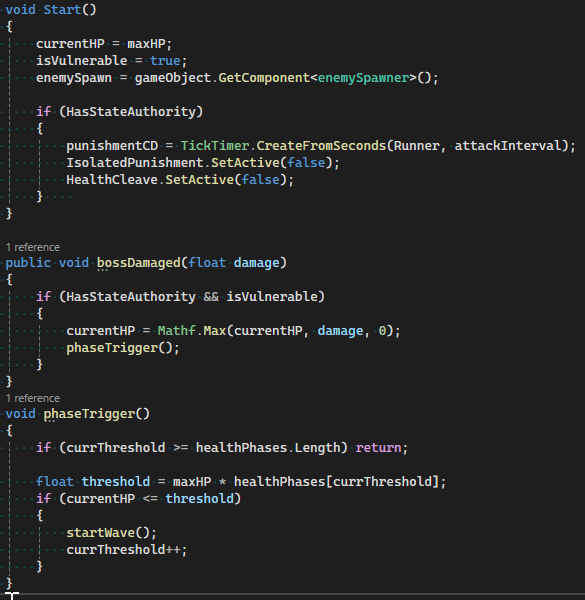
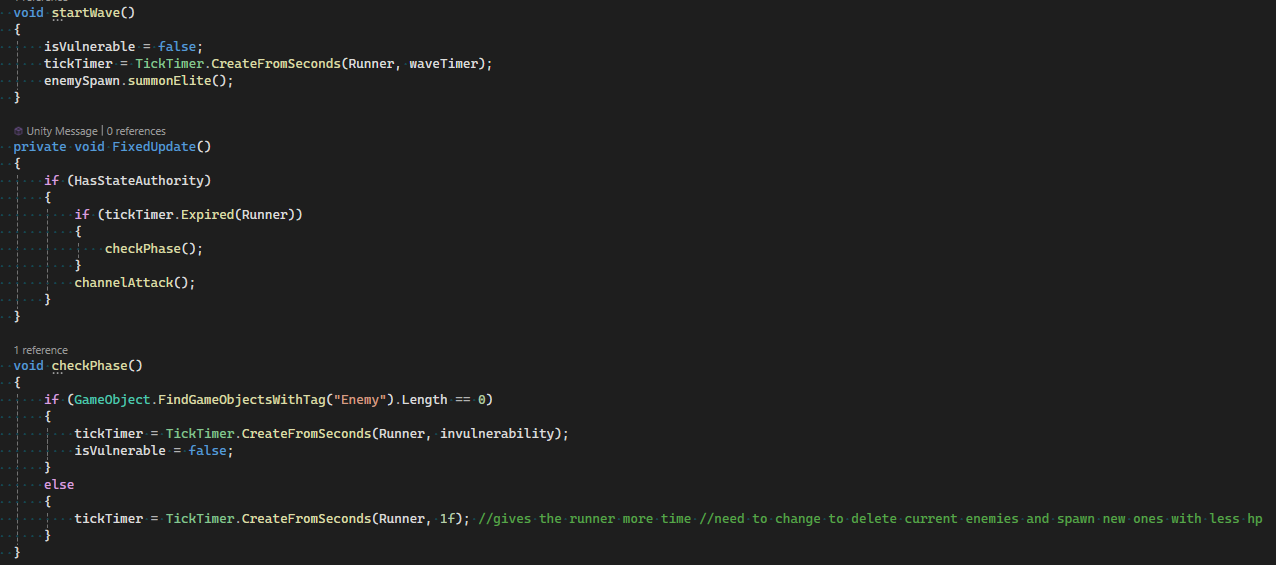
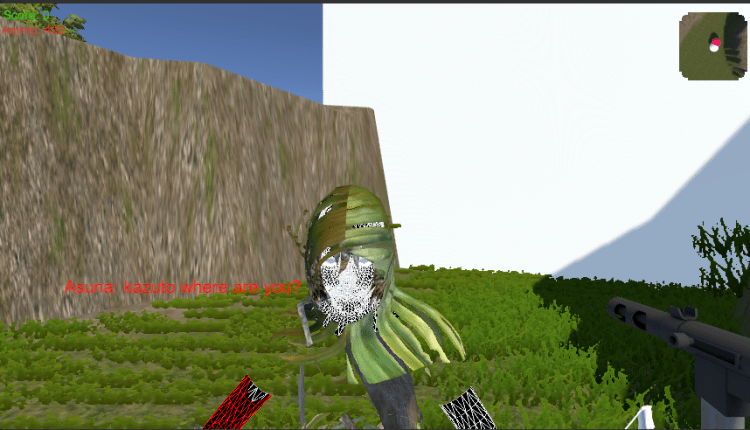
I began work on the boss enemy, which features four difficulty phases (with phases 1–3 implemented and phase 4 delayed). The boss’s mechanics include:

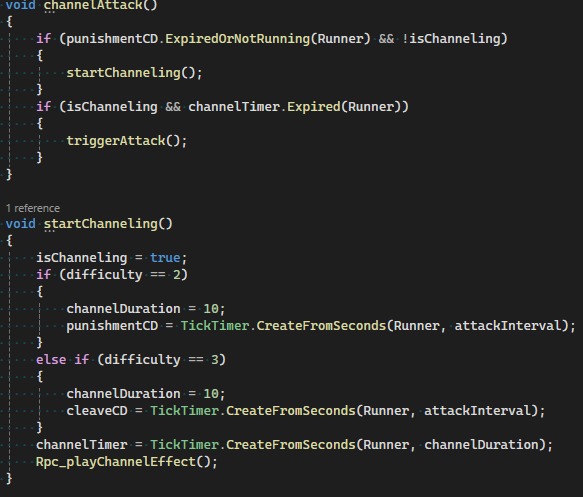
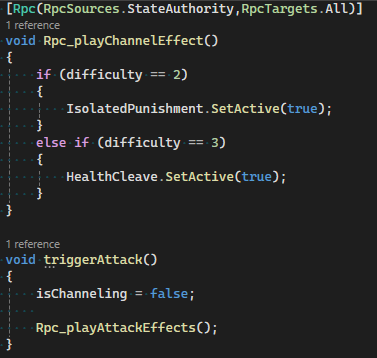
  • State Management: All mechanics are managed via timers, networked variables, and RPCs for synchronized multiplayer gameplay.
  • Phase Triggers: At every 25% HP lost, the boss spawns elite enemies. Players must defeat all enemies before the boss becomes vulnerable again; otherwise, enemies respawn after a set time.
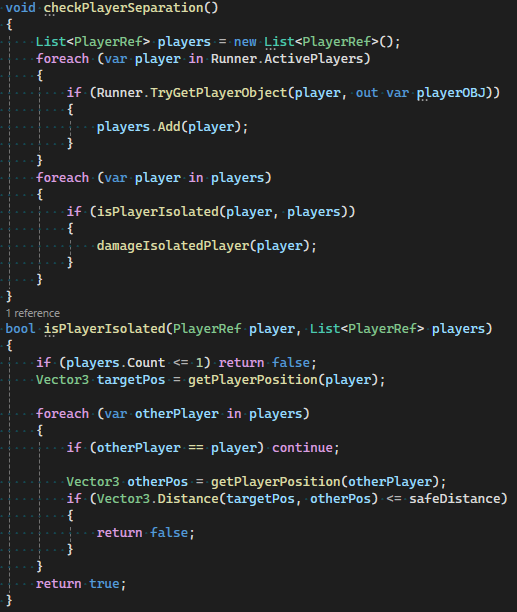
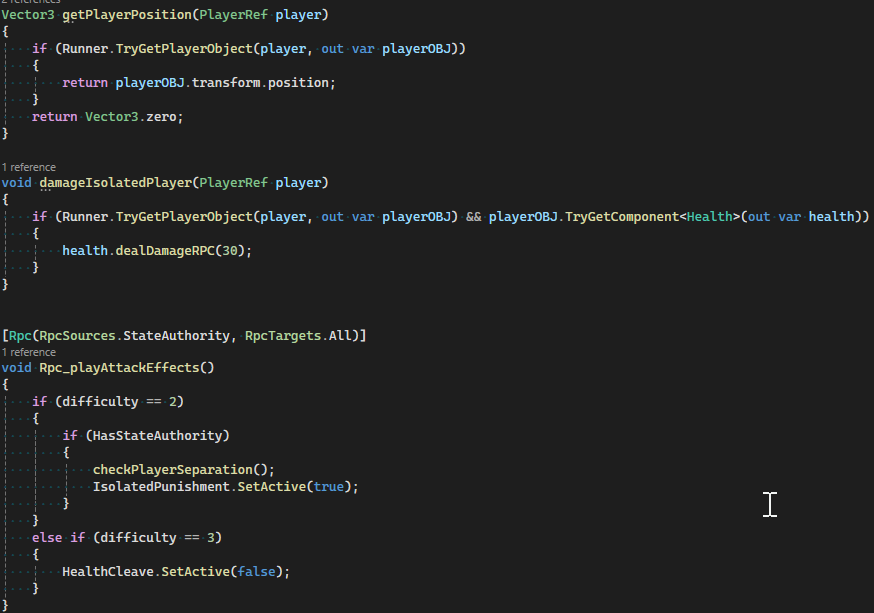
  • Difficulty 2 – Isolation Mechanic: Every 5–30 seconds, the system checks if players are separated. Isolated players take damage, encouraging team coordination.
  • Difficulty 3 – Cleave Mechanic: Players must move to safe zones to avoid a damaging cleave attack.

This approach is similar to best practices for multi-phase boss design in Unity, where state machines and timers manage transitions and mechanics

Projectile Refactor: Range-Based Despawning

Previously, projectiles were despawned after a fixed lifetime. I refactored the logic so that bullets now despawn based on distance traveled, allowing for more flexible weapon balancing (e.g., sniper rifles vs. shotguns).

Before:

  • Projectiles used a lifeTime variable and despawned after a set duration.

After:

  • When the total distance exceeds maxDistance, the projectile despawns.
  • Projectiles now track their starting position and sum the distance traveled each frame.

This method is consistent with recommendations for ranged weapon systems in Unity and Photon Fusion, where projectiles are often managed by distance for gameplay variety and network efficiency.

Above is the changed code using Github

Reflection

Despite the lack of new visual assets, this sprint enabled significant progress on core gameplay systems. The boss’s phase logic and new projectile mechanics lay a strong foundation for future content and balancing. The experience also highlighted the importance of clear communication and asset planning in collaborative projects.

References

Week 4: Implementing a Networked XP System

Introduction

This week, I focused on developing a server-authoritative XP system to support our game’s progression mechanics. The system includes:

  • A networked XP counter with scaling level thresholds
  • A global UI slider visible to all players
  • Foundation for future stat-selection mechanics

I ensured this system aligns with our core gameplay loop of combat → rewards → character growth.

Design Rationale

The system was designed to:

  • Maintain Performance: Uses Photon Fusion’s [Networked] properties for efficiency.
  • Sync Across All Players: Server-managed values prevent cheating or desynchronization.
  • Scale with Progression: Level-up thresholds increase by 100 XP per level.
  • Support Future Features: Built to integrate with unassigned stat upgrades (design placeholder).

Implementation

1. Server-Managed XP Slider (Client-Side UI)

Above is the core implementation of the XP_Slider script:

Key Features:

  • Automatic reference to the networked XP_System
  • Real-time UI updates via Update()
  • TextMeshPro for crisp text rendering

2. Networked XP Logic (Server-Authoritative)

Above is the core implementation of the XP_System script:

Key Features:

  • Network-safe value modification (StateAuthority only)
  • Event-driven XP allocation via onEnemyKilled
  • Linear threshold scaling for predictable progression

Collaborative Challenges

Provided test build with debug XP gain shortcuts

UI Synchronization:

  • Initial client-side slider jitter resolved with Networked properties

Event System Refinement:

  • Created custom onEnemyKilled event to avoid GameObject searches
  • Worked with combat programmer to standardize XP values per enemy type

Design Coordination:

  • Documented API for future stat-selection UI integration

Reflection

What Worked Well

  • Networked properties simplified state synchronization
  • Linear XP scaling provided clear progression pacing
  • Decoupled UI system allows easy art replacement

Areas for Improvement

  • Level-up events lack visual/audio feedback (placeholder only)
  • Current UI doesn’t show “XP to next level” numerically

Next Steps

Player Feedback:

  • Add particle effects on XP gain (collaborate with VFX team)
  • Implement “level up” sound

Stat Selection System:

  • Develop upgrade menu interface
  • Create [Networked] stat modifiers (attack speed, health, etc.)

References

Week 3: Enemy Spawner Implementation & Player Combat Development

Introduction

For the third week of our group game development project, my primary focus was designing and implementing a networked enemy spawner. This system introduces enemies into the game world when a player triggers a specific object (such as a trap). The spawner manages enemy instantiation at set intervals, enforces a maximum enemy limit, and synchronizes these events across all players using Photon Engine and Unity.

Design Rationale

Although my main responsibility is programming, I approached this task with a design-oriented mindset. My goals for the enemy spawner were to:

  • React to player interaction by activating only when triggered.
  • Enforce a maximum enemy count to maintain game balance and performance.
  • Introduce a spawn delay to create tension and pacing.
  • Synchronize enemy spawning across the network so all players share the same experience.

I collaborated with the design team to ensure the spawner’s behavior supports our weekly group objectives and enhances the intended gameplay loop.

Implementation

Below is the core script I developed for the enemy spawner. It leverages Photon Engine for networked object spawning and Unity’s game object system for positioning.

Above is the core implementation of the enemySpawnerActivator script:

Key Features

  • Trigger Activation: The enemySpawnerActivator flag is set by player interaction, ensuring the spawner only activates at the right time.
  • Networked Spawning: Uses Fusion’s Runner.Spawn to ensure all players see the same enemies.
  • Spawn Limiting: Checks the current enemy count before spawning new ones to maintain the maximum limit.
  • Randomized Positioning: Spawns enemies at random points within a defined radius for unpredictability.

Part 1: Melee Attack System

At the design team’s request, I developed a prototype melee combat system for our close-range character. This required:

  • Ensuring network-synchronized attack motions
  • Distinguishing melee/ranged characters via characterType
  • Creating a temporary weapon animation (pending final art assets)
Above is the core implementation of the playerMelee script:

Design Choices

  • Positioned weapon via code (characterTransform()) to support future art iteration
  • Created procedural weapon swing animation (arc rotation)
  • Added attack delay to prevent spamming
  • Used Networked properties to sync attack states

Part 2: Mouse-Driven Player Rotation

To improve combat fluidity, I replaced keyboard-based rotation with mouse-aiming:

Above is the core implementation of the playerRotation script:

Key Features

  • Ground-plane projection for consistent 3D aiming
  • Smooth rotation interpolation (Quaternion.Slerp)
  • Network-synced orientation using Fusion’s [Networked]

Collaborative Process

Documented transform requirements for 3D artists

Design Coordination

  • Worked with designers to balance attack speed/delay
  • Created temporary visual feedback for testing (weapon arc)

Technical Challenges

  • Synchronized animation states across network
  • Resolved camera-raycasting issues in multiplayer
  • Optimized FixedUpdateNetwork for input responsiveness

Art Pipeline Preparation

  • Structured code to easily replace procedural animation with future art assets

Reflection & Iteration

What Worked Well

  • Hybrid approach (code-driven animation + network sync) accelerated prototyping
  • Mouse rotation significantly improved playtest feedback (“More intuitive than keyboard turning”)

Areas for Improvement

  • Current weapon reset uses linear interpolation – could benefit from animation curves
  • Networked rotation occasionally jitters at high latencies

Next Steps

  • Collaborate with artists to replace procedural animation
  • Implement hit detection with enemy spawner system
  • Add visual/audio feedback for attacks

References

Connected Games Blog – Week 2 (Continued): Expanding Combat Systems

Implementing Weapon Mechanics

With health systems in place, I focused on developing core combat mechanics. To support diverse playstyles, I created a modular playerShooter script that allows players to switch between pistol, shotgun, and rifle weapon types. Each weapon has unique fire rates, projectile patterns, and cooldowns.

Above is the core implementation of the playerShooter script:

Projectile Lifetime and Damage

Projectiles require careful network synchronization. I implemented a ProjectileCode class that automatically despawns after 2 seconds and handles damage calculation on enemy collision:

Above is the core implementation of the ProjectileCode script:

Loot System with Rarity Scaling

To support roguelike progression, I created an RNGSystem that generates randomized weapons with rarity-based stat scaling:

Above is the core implementation of the RNGSystem script:

Enemy AI and Navigation

Enemies use Unity’s NavMesh to pathfind toward the nearest player. The EnemyScript includes XP rewards and loot dropping functionality:

Above is the core implementation of the EnemyScript script:

Design Thinking

Combat Flow Design:

  • Weapon Differentiation: Shotguns reward positioning, rifles enable sustained fire, pistols offer precision
  • Risk vs Reward: High-damage enemies require teamwork to defeat but drop better loot
  • Network Optimization: Projectile collision is authority-managed to prevent cheating

Technical Considerations:

Separated visual effects from network-critical code to maintain performance

Used Fusion’s TickTimer for framerate-independent cooldowns

Implemented object pooling for projectiles to reduce GC pressure

Reflection and Next Steps

Progress:

  • Established core combat loop (shoot → loot → upgrade)
  • Validated networked weapon behavior with 3 distinct types
  • Implemented basic enemy AI that scales to 4 players

Immediate Challenges:

Optimizing NavMesh recalculation for large enemy counts

Balancing weapon stats across different rarities

Preventing projectile collision false positives in crowded battles

References

Unity Technologies. (2024). Rigidbody Physics System. Retrieved May 2, 2025, from https://docs.unity3d.com/Manual/class-Rigidbody.html

Unity Technologies. (2025). NavMesh Agent Documentation. Retrieved May 2, 2025, from https://docs.unity3d.com/Manual/nav-AgentTypes.html

Photon Engine. (2025). Networked Object Pooling Best Practices. Retrieved May 2, 2025, from https://doc.photonengine.com/fusion/current/manual/network-objects

ShareX Team. (2025). ShareX: Free and Open Source Screenshot Tool for Windows. Retrieved May 2, 2025, from https://getsharex.com

Imgur. (2025). Online Image Sharing and Hosting Service. Retrieved May 2, 2025, from https://imgur.com

Connected Games Blog – Week 2: Implementing Roguelike Foundations

Project Pivot: Transitioning to Roguelike Mechanics

This week, our team shifted focus to a roguelike game design where players battle monsters, collect loot, and face a final boss. While this change required rapid adaptation, I prioritized building core systems to support scalability and networked gameplay. Below is my progress on foundational health mechanics and player feedback systems.

Player Health System

To enable combat and progression, I developed a networked Health script. This system synchronizes health values across all players, updates a UI health bar in real time, and handles damage events. The script also includes a Downed() method to track player defeat, which will later trigger respawn or game-over logic.

Above is the core implementation of the Health script:

Health Manager for Scalability

To support multiple players and ensure synchronized UI across clients, I created the HPManager class. This system dynamically spawns health bars for each player, positions them cleanly on-screen, and updates them when damage is taken. The manager uses Fusion’s networking to maintain consistency between all clients.

Above is the core implementation of the HPManager script:

Design Thinking

Why These Systems Matter:

  1. Networked Health Synchronization: Ensures all players see the same game state, critical for cooperative play.
  2. Scalable UI Management: The HPManager automatically adapts to new players joining, essential for a roguelike that may feature temporary allies or revived teammates.
  3. Modular Damage Handling: The dealDamageRPC method can be extended for future mechanics like armor, healing, or status effects.

Technical Decisions:

  • Used Fusion’s [Networked] attribute to minimize latency in health updates.
  • Implemented an RPC (dealDamageRPC) to decouple damage calculation (server-side) from visual feedback (client-side).
  • Designed the HPManager as a singleton to simplify global access while avoiding redundant instances.

Reflection and Next Steps

Progress This Week:

  • Established baseline systems for player survivability and team coordination.
  • Validated UI scalability for 2–4 players (see Image 2).
  • Prepared infrastructure for future mechanics like debuffs or team-based power-ups.

Upcoming Tasks:

  1. Gun Mechanics: Implement networked weapon systems with projectile spawning and ammo management.
  2. Enemy AI Prototyping: Create basic enemy movement and attack patterns.
  3. Loot System: Design a framework for item drops and stat upgrades.

Challenges to Address:

Balancing immediate visual feedback with server-authoritative logic.

Ensuring health bar positioning remains consistent across different screen resolutions.

Optimizing network traffic as the number of interactable objects grows.

References

Next week: A deep dive into weapon systems and early enemy AI!

Connected Games Blog – Week 1.5: Prototyping Interactable Objects

Experimenting with Interactivity

Building on the foundation from Week 1, I dedicated the next day to exploring basic interactivity within our prototype. My goal was to implement and test simple interactable objects, laying the groundwork for more complex cooperative mechanics in the future.

To start, I introduced a set of cubes into the scene, each designed to respond to player interaction in different ways. One of the key features I wanted to prototype was a “trigger and response” system-similar to a classic door and key puzzle-where interacting with one object would cause another object to move or change state.

Interactable Object Script

I created an interactableObject script to handle these interactions. The script links the interactable object (such as a key or button) to a target object (such as a door or wall). When the player interacts with the primary object, the target object animates (in this case, moving downward to simulate a door opening) and is then destroyed, along with the original interactable.

Above is the core implementation of the interactableObject script:

Integrating Interaction with Player Movement

To enable player-triggered interactions, I updated the playerMovement script. Now, when the player enters a trigger collider tagged as “interactable,” the script checks the interaction type. If it’s a wall, the interaction sequence is triggered, causing the wall to move and disappear. Otherwise, the object simply changes color, providing immediate feedback to the player.

Above is the TriggerEnter implementation of the playerMovement script:

Design Thinking

This iteration was focused on rapid prototyping and validating the core logic behind interactable objects. By using simple cubes and basic movement, I was able to quickly test the interaction flow and identify potential issues early. The modular approach-linking interactable objects to targets via script-makes it easy to expand this system for more complex puzzles and cooperative mechanics later in development.

This experiment also helped clarify how player actions can influence the environment, which is central to our goal of creating meaningful cooperation between the 2D and 3D players. The visual feedback (such as color changes and moving objects) reinforces the impact of player choices and will be essential for player engagement as the project evolves.

Reflection and Next Steps

With basic interactable functionality in place, the next step is to:

  • Expand the variety of interactable objects (e.g., switches, pressure plates).
  • Integrate these systems into both 2D and 3D gameplay environments.
  • Begin designing puzzles that require both players to collaborate using these mechanics.
  • Ensure that all interactions are properly networked so both players see the results in real time.

I will continue to iterate on these systems, documenting key changes and insights in future blog posts.

References

Stay tuned for more updates as we continue to build and refine our cooperative gameplay systems!

ConConnected Games Blog – Week 1: Prototyping Dual-Perspective Gameplay

Exploring Game Concepts

This week, with our designers unavailable, I collaborated closely with the second programmer to brainstorm possible directions for our group project. We wanted to create a unique cooperative experience, so we explored the idea of combining 2D and 3D gameplay. Our concept involves two players: one controls a character in a 2D world, while the other navigates a 3D environment. The core mechanic centers on collaboration-players must work together across dimensions to solve puzzles and progress.

My Contribution: Player Spawner System

To support this concept, I began developing the foundational code for our player spawning system. Drawing from the Photon Fusion 2 documentation, I implemented a script that dynamically assigns players to either the 2D or 3D character based on their join order. This ensures that the first player to join becomes the 2D character, while the next becomes the 3D character. I also expanded the code to support multiple spawn positions, allowing for flexible level design in the future.

Above is the core implementation of the PlayerSpawner script:

Expanding Player Movement

After setting up the player spawner, I wanted to understand how Fusion 2 handles networked movement. I followed the official documentation to create a basic character controller, then expanded it to support both 2D and 3D perspectives. The camera’s behavior is determined by the player’s role: if the player is in 2D mode, the camera switches to a top-down view; if in 3D, the camera follows behind the player in third-person.

Above is the core implementation of the playerMovement script:

Top-Down Camera Implementation

To achieve the desired top-down effect for the 2D player, I created a custom camera script. I manually adjusted the camera’s position and rotation in the Unity editor, then translated those settings into code so the camera would always follow the player from above.

Above is the core implementation of the TopDownCamera script:

Player Color and Networked Interactivity

Finally, to test networked interactions, I implemented a simple color-changing system for the player character. Following the Fusion 2 documentation, I created a script that allows the player to change their color by pressing the “E” key. This not only demonstrated networked variable synchronization but also laid the groundwork for future interactable objects.

Above is the core implementation of the PlayerColor script:

Design Thinking

Although my primary role is programming, these early technical decisions are deeply intertwined with the game’s design. The player spawner system ensures that each player has a unique perspective and role, directly supporting our cooperative gameplay vision. The dual-perspective camera system not only enhances immersion but also clearly differentiates player experiences, which is central to our design concept. Implementing networked color changes gave me valuable insight into how Fusion 2 handles state synchronization, which will be essential as we introduce more complex interactions.

By keeping the code modular and adaptable, I am ensuring that our systems can evolve as the design matures and as new gameplay mechanics are introduced. This iterative approach allows us to quickly prototype, test, and refine ideas, which is especially important given the collaborative and experimental nature of our project.

Reflection and Next Steps

This week’s work established the technical foundation for our unique dual-perspective cooperative gameplay. The player spawner, movement, camera, and networked interaction systems are all in place and ready for further iteration. Moving forward, I plan to:

  • Refine the movement scripts for both player types to improve responsiveness and feel.
  • Expand the camera systems for smoother transitions and better player feedback.
  • Begin developing the first cooperative mechanics that require players to interact across dimensions.
  • Work closely with the designers (when available) to ensure our technical solutions align with the evolving game vision.

I will continue to document my contributions and design decisions in upcoming posts, providing code snippets, screenshots, and reflections on the development process.

References

Stay tuned for more updates as we bring this innovative cooperative concept to life!

Above is the Unity Version Control Change

Connected Games Blog – Introduction

Welcome to my development blog for the Connected Games group project, created as part of my university coursework. This blog will be updated regularly, providing a transparent record of my personal contributions and design thinking as our team progresses through the project.

Project Overview

Our group has chosen to develop a 3D multiplayer game using Unity 6, leveraging the Fusion 2 networking library for robust state synchronization. Unity was selected due to our collective familiarity with its workflow and toolset, which allows us to focus on creative problem solving rather than overcoming technical barriers.

My Initial Contribution

In alignment with our group`s first objective to establish a playable prototype, I took responsibility for setting up the initial 3D play area. This involved creating a basic environment in Unity where we could quickly test and iterate on core gameplay mechanics. My intention was to provide a flexible sandbox space that would support experimentation as our design ideas evolve

To enable early playtesting, I implemented a simple player chartacter using Unity`s Starter Assets. This allowed us to immediately assess movement controls and begin discussing possible gameplay directions. The image below shows the initial prototype environment

Several walls with a ground with a top down view

Design Thinking

Although my primary role is programming, I recognize the importance of design in shaping both the architecture and user experience of our game. My approach emphasizes modularity and scalability, ensuring that the systems I build can adapt to changes in our design as the project progresses. For example, the area was deliberately kept minimal to avoid constraining our creative options in future sprints.

Looking Ahead

As our group refines the game concept and sets new objectives, I will continue to document my technical and design decisions, including code snippets, architectural diagrams and annotated screenshots. This blog aims to provide clear insights into my personal workflow, the challenges encountered and the rationale behind key choices- demonstrating both my technical proficiency and my collaborative mindset

Stay tuned for regular updates as we bring our connected game to life!

https://assetstore.unity.com/packages/essentials/starter-assets-firstperson-updates-in-new-charactercontroller-pa-196525
Unity Version Control, showing date of initial set up

References

Photon Engine. (2025). Fusion 2 Introduction. Retrieved May 2, 2025, from https://doc.photonengine.com/fusion/current/fusion-intro

Unity Technologies. (2025). Unity Engine. Retrieved May 2, 2025, from https://unity.com/products/unity-engine

Unity Technologies. (2024). Starter Assets – FirstPerson. Unity Asset Store. Retrieved May 2, 2025, from https://assetstore.unity.com/packages/essentials/starter-assets-firstperson-updates-in-new-charactercontroller-pa-196525

ShareX. (2025). Free and Open Source Screenshot Tool for Windows. Retrieved May 2, 2025, from https://getsharex.com

Imgur. (2025). Online Image Sharing and Hosting Service. Retrieved May 2, 2025, from https://imgur.com

Design a site like this with WordPress.com
Get started